8 Best TKL Gaming Keyboards 2023


If you're shopping for TKL keyboards, you might be overwhelmed with choice. TKL keyboards are slightly smaller than your average sized keyboard as they do not have a 10-key numeric keypad on the right side. For many people, TKL keyboards are preferable as they take up less room on your desk and many people don't use the missing keys anyway.
If you're wondering what type of TKL keyboard is best for you, we've picked out some of the best TKL keyboards that you can shop with a student discount, to suit all budgets and all gamers, regardless of your level.
Whether you're looking for an upgrade for your current keyboard or this is your first gaming keyboard, check out our top picks for TKL gaming keyboards below.
The best TKL wired gaming keyboards
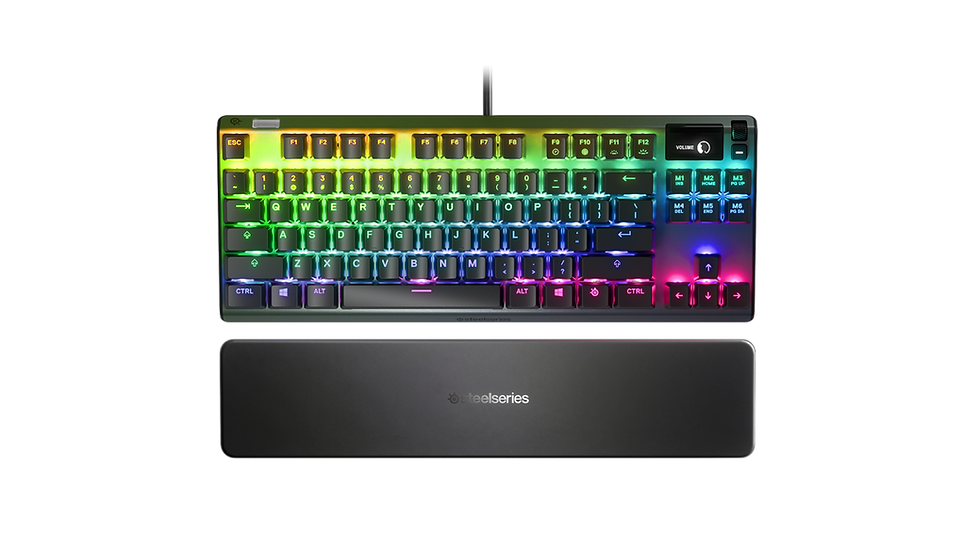
The SteelSeries Apex Pro TKL is the world's bestselling TKL keyboard, which is a great reason to invest in it. The keyboard comes with the first of its kind adjustable mechanical switches for customisable per-key sensitivity and is fast and durable.
It comes with a soft touch magnetic wrist rest to help keep you comfortable while you're playing and OLED smart display and dynamic per-key RGB illumination with millions of colour options to create your perfect gaming setup;
Specs:
Connectivity – Wired
Size – TKL
Mechanical – yes
Switches – OmniPoint Adjustable Mechanical Switches
Volume roller – yes
Backlighting – yes
Pros
Award-winning
Can be synced with other SteelSeries accessories
Magnetic wrist rest for comfort
Cons
Mid-range in terms of price, but there are cheaper keyboards out there

The Razer BlackWidow V3 with green mechanical switches comes in a classic design for optimised performance when gaming. The Green switches allow you to hear and feel the feedback in every keystroke in a tactile and clicky design and the compact layout allows easier positioning to get your desk setup perfect.
The BlackWidow V3 also comes with grooves to allow you to neatly tuck in the cables to help keep your desktop clear and free of any clutter. You can also choose from 16.8 million colour options to personalise your keyboard.
Specs:
Connectivity – Wired
Size – TKL
Mechanical – yes
Switches – Green
Volume roller – no
Backlighting – yes
Pros
Affordable and under £100
Cons
Green switches might not be ideal

The HyperX Alloy Origins Core is an ultra-compact and sturdy TKL gaming keyboard with custom HyperX mechanical switches to provide optimal performance. The keyboard has an aluminium body and the keyboard feet have 3 different levels to choose from, so you can set your keyboard up at the right angle for your height.
With Game Mode, 100% anti-ghosting and HyperX GENUITY software allowing you to personalise your keyboard, it's a great all-around option if you're looking at TKL keyboards.
Specs:
Connectivity – Wired
Size – TKL
Mechanical – yes
Switches – Aqua
Volume roller – no
Backlighting – yes
Pros
Affordable and under £100
Cons
Not wireless
The best TKL wireless gaming keyboards

The Logitech G G915 TKL keyboard is wireless and has high-performance and low-profile mechanical switches. G915 TKL features pro-grade LIGHTSPEED wireless that achieves super-fast 1 ms performance and you can use it while it's charging via USB so you don't need to worry about running out of battery life.
There are three switch types you can choose from; GL Clicky (audible click and tactile feedback), GL Tactile (a gentle bump for some tactile feedback) and GL Linear (a completely smooth keystroke). The keyboard being wireless means you can benefit from connecting multiple devices, use dedicated media controls and switch easily between game mode to disable keys you don't need.
Specs:
Connectivity wireless
Size – TKL
Mechanical – yes
Switches – Brown, Red or White
Volume roller – yes
Backlighting – yes
Pros
Wireless
Media controls for easy use
Cons
Expensive

The OMEN Spacer Wireless TKL Gaming Keyboard has lightning-fast Cherry MX Brown Switches with a response time of 1ms that are super durable, lasting up to 100 million keystrokes. A full charge will give you 75 hours of battery life and a 5-minute charge will give you 6 hours of battery and despite being wireless, the connection is still reliable and consistent and as fast as wired.
Specs:
Connectivity – wireless
Size – TKL
Mechanical – yes
Switches – Cherry MX Brown
Volume roller -no
Backlighting – yes
Pros
Wireless but still reliable
Fast charging
Long battery life
Cons
Mid-range in terms of price, there are cheaper models out there
Get a student discount at HP

The ASUS ROG Claymore II is a versatile keyboard with a detachable numpad that can be placed to either side to suit your gaming setup if you need it. You can choose from either red or blue switches with centralized lighting to provide consistent and wobble-free keystrokes and near-zero debounce delay. The keyboard has an ergonomic design with a detachable magnetic wrist rest for comfortable gaming and a single charge will give you up to 43 hours of battery life.
Specs:
Connectivity – wireless (but can be used wired)
Size – TKL
Mechanical – yes
Switches – Red or Blue
Volume roller – yes
Backlighting – yes
Pros
Can be used as wireless or wired
Long battery life
Wireless Aura Sync RGB allows you complete freedom for customisation
LED battery indicator
Cons
Expensive and in the top end of the price range for TKL keyboards on this list
Best budget keyboard for gaming

The Acer Nitro gaming keyboard is a really good keyboard if you're on a budget, but don't want to compromise on quality. With anti-ghosting for 19 keys, 4 brightness levels and 3 preset modes and 3-Zone RGB backlighting, it's the perfect addition to your gaming setup if you're just getting started.
Specs:
Connectivity – wired
Size – TKL
Mechanical – yes
Switches – blue
Volume roller – no
Backlighting – yes
Pros
Affordable and budget-friendly
Cons
More expensive keyboards will have better overall specs and performance
Not wireless
Get a student discount at Acer
Best compact keyboard for gaming

The Apex TKL 7 benefits from an OLED digital display to help deliver notifications straight from your games and apps, so you won't have to switch between tabs on your PC to see what's happening. You can choose from red, blue or brown switches which are durable and guaranteed for 50 million keypresses. The magnetic wrist rest is detachable and can be removed if you prefer a more minimalistic desk setup, but can provide comfort and support while in-game. You can also sync your keyboard up with other SteelSeries accessories and customise with millions of colour options to choose from.
Specs:
Connectivity – Wired
Size – TKL
Mechanical – yes
Switches – Red, blue or brown
Volume roller – yes
Backlighting – yes
Pros
Volume roller
Soft wrist pad
Discord and game notifications
OLED smart display for notifications and updates
Cons
Mid-range in terms of price, there may be more affordable models out there with similar features
What to look for in gaming keyboards
Gaming keyboards can cover all ends of the spectrum in terms of budget, the more expensive ones are arguably going to have better features but the more budget-friendly ones can also be a great option as long as it has certain features. All (good) gaming keyboards should have anti-ghosting features, as well as a backlit keyboard and key customisation options to best suit your needs and how you like to play.
Are TKL keyboards worth buying?
TKL keyboards are handy if you like to have a more compact or minimalist desk setup, or if you don't have a huge amount of desk space. Many people also find that the numpad isn't necessary to use anyway and just takes up unnecessary space so if you want your desk layout to be perfect and not too crowded a TKL keyboard is the best option.
How to clean a mechanical keyboard
Gaming keyboards can get dirty if you're using them every day. If you want to clean your mechanical keyboard, first unplug it (if it's non-wireless) and use a small vacuum to hoover up any loose crumbs or dust on the top of the keyboard. To get to the deeper dirt, use a microfibre cloth which is slightly damp to get between the keys and then dry it with another dry cloth.
What keyboard does Clix use?
Twitch streamer and Fortnite player Clix currently uses a TKL mechanical GK61 keyboard, similar to many that have been suggested in this list.